Wayland Desktops on Debian Trixie
Update — 2026-08-03. Now four parallel stacks — niri, sway, labwc, hyprland — all on Noctalia v5 at 1.5× scale on HDMI-A-1 (the AOC panel moved off DisplayPort). The termusic MPRIS quirk that used to need a startup workaround got fixed at the source.
Wayland Desktops
I’ve been using Linux for nearly two decades — Ubuntu, openSUSE, Fedora, Debian. Early on there weren’t many desktop choices, so GNOME was the default. I never warmed to KDE; its UI philosophy never clicked with me. Over time I gravitated toward minimal desktops — XFCE, LXDE, then LXQt. Wayland was the next milestone, but none of these ran well under it. Last year I finally got LXQt working with labwc on Wayland, and it held up until this year when I moved to Noctalia.
Last week I sat down with my Debian Trixie workstation (NVIDIA GTX 1070 Ti, AOC 27” 4K, 1.5× scale on HDMI-A-1) and built four parallel Wayland desktop stacks, all sharing one shell:
- niri + Noctalia — scrollable-tiling compositor
- sway + Noctalia — classic i3-style tiling
- labwc + Noctalia — stacking (Win/macOS-style)
- hyprland + Noctalia — dynamic tiling
Same shell everywhere: Noctalia’s capsule_group system produces compact, connected widget pills, and one set of TOML config plus one IPC (noctalia msg) works unchanged across all four. Switching compositors is just choosing a different SDDM session.
Background
Why four compositors?
They’re just different window-management philosophies bolted in front of the same Noctalia shell. Noctalia is compositor-agnostic — a layer-shell client the compositor spawns — so the bar, dock, notifications, launcher, lock screen and theme are identical on every stack. Only the compositor side changes:
| Compositor | Style | Spawn Noctalia via |
|---|---|---|
| niri | Scrollable tiling (Mac-spaces-like) | spawn-at-startup "noctalia" "--daemon" in config.kdl |
| sway | Classic i3 tiling | exec_always ... noctalia --daemon in config |
| labwc | Stacking (windows overlap) | setsid -f noctalia --daemon in autostart |
| hyprland | Dynamic tiling | hl.exec_cmd("noctalia --daemon") on hyprland.start |
I keep all four around because the window behaviour differs a lot (niri’s scrollable columns, sway’s i3 muscle memory, labwc’s free stacking, hyprland’s dynamic tiles) even though the shell doesn’t. The config I actually tweak day-to-day — ~/.config/noctalia/*.toml — is shared.
What lives where
~/.config/noctalia/ Noctalia settings (TOML modules, shared)~/.config/niri/ niri compositor config~/.config/sway/ sway compositor config~/.config/labwc/ labwc compositor config + autostart/shutdown~/.config/hypr/ hyprland compositor config (Lua)~/.config/termusic/ shared music daemon config (server + tui)~/.config/fcitx5/ shared input method configInstalling the components
Debian Trixie is conservative — most things either come from a third-party repo or get built from source. Run these once before configuring any stack.
1. Install compositors
# niri (Trixie backports has it)sudo apt install -t trixie-backports niri
# sway (Trixie main)sudo apt install sway
# labwc — Trixie main has 0.8.3, I built 0.20.0 from upstream master# (steps in ~/development/osc/desktop/labwc-build/)All three ship a /usr/share/wayland-sessions/*.desktop so SDDM picks them up.
2. Build Noctalia from source
No Debian package; clone the v5 repo and just-build:
sudo apt install -y libqt6{quick,qml,quickcontrols2,svg,wayland}-dev \ qt6-base-dev qt6-tools-dev meson ninja-build pkg-config
git clone https://github.com/Noctalia-dev/noctalia-shell.gitcd noctalia-shelljust configure release "/usr"just buildsudo just install # → /usr/bin/noctaliaAfter upgrading the source you must just build && sudo just install and restart noctalia, otherwise new widget IDs added to your *.toml won’t render — noctalia config validate only checks TOML syntax, not whether the running binary knows the widget.
3. Build termusic with mpv backend
The Debian package ships only the rusty backend, which mis-resamples 44.1k WAV → static noise. Build from source with --features all-backends and choose mpv:
sudo apt install -y libmpv-dev libsoundtouch-dev \ libgstreamer1.0-dev libgstreamer-plugins-base1.0-dev
git clone https://github.com/tramhao/termusic.gitcd termusicmake all-backends
install -m755 target/release/termusic ~/.local/bin/termusicinstall -m755 target/release/termusic-server ~/.local/bin/termusic-server4. Install Maple Mono NF CN font
One font that bundles Nerd Font icons (NF variants) AND CJK glyph coverage (CN variant). Used by Noctalia, fcitx5, ghostty, vim — everything terminal-ish.
VERSION="v7.4"TMP=$(mktemp -d)curl -L -o "$TMP/MapleMono-NF-CN.zip" \ "https://github.com/subframe7536/maple-font/releases/download/${VERSION}/MapleMono-NF-CN.zip"
sudo mkdir -p /usr/share/fonts/maplecd "$TMP" && unzip MapleMono-NF-CN.zipsudo install -m644 *.ttf /usr/share/fonts/maple/sudo fc-cache -fv | grep -i maple
fc-match 'Maple Mono Normal NF CN'# → MapleMonoNormal-NF-CN-Regular.ttf: "Maple Mono Normal NF CN" "Regular"5. Install shared bits
sudo apt install \ fcitx5 fcitx5-chinese-addons fcitx5-frontend-gtk4 fcitx5-frontend-qt6 \ flameshot playerctl ddcutil cosmic-files6. Sanity check
$ which niri sway labwc hyprland noctalia termusic-server/usr/bin/niri/usr/bin/sway/usr/bin/labwc/usr/bin/hyprland/usr/bin/noctalia/home/jenningsl/.local/bin/termusic-server
$ ls /usr/share/wayland-sessions/labwc.desktop niri.desktop sway.desktopStack A: Niri + Noctalia
niri is a scrollable-tiling compositor (Mac-spaces-like). Noctalia runs as a plain child process spawned straight from niri’s config — no systemd unit, no graphical-session.target chain.
Step 1 — Spawn Noctalia from niri
~/.config/niri/config.kdl:
// Noctalia v5 — desktop shell. spawn-at-startup fires once at niri-session login.// `--daemon` matches the labwc/sway/hyprland stacks.spawn-at-startup "noctalia" "--daemon"spawn-at-startup runs once at login — it does not re-run on config reload (unlike sway’s exec_always) — so a crashed Noctalia is restarted by hand: pkill -x noctalia; setsid -f noctalia --daemon.
Step 2 — Layer rules + the settings window
Noctalia’s surfaces are layer-shell clients; two niri rules make them behave (from the Noctalia niri doc):
// Blurred/tinted wallpaper copy sits inside niri's overview backdrop// ("Option 1: blurred overview wallpaper")layer-rule { match namespace="^noctalia-backdrop" place-within-backdrop true}
// Noctalia's settings window — floating, fixed sizewindow-rule { match app-id="dev.noctalia.Noctalia" open-floating true default-column-width { fixed 1080; } default-window-height { fixed 920; }}Step 3 — Output scale (4K @ 1.5×)
// ~/.config/niri/noctalia/outputs.kdl — monitor is on HDMI-A-1, not DP-1output "HDMI-A-1" { mode "3840x2160@60.000" scale 1.5}Step 4 — Keybinds → Noctalia IPC
Every shell action (launcher, control center, volume, lock, screenshot…) goes through one compositor-agnostic CLI — noctalia msg — which niri just spawns:
binds { Mod+Space { spawn-sh "noctalia msg panel-toggle launcher"; } // app launcher Mod+S { spawn-sh "noctalia msg panel-toggle control-center"; } Mod+Comma { spawn-sh "noctalia msg settings-toggle"; } Mod+V { spawn-sh "noctalia msg panel-toggle clipboard"; } Mod+N { spawn-sh "noctalia msg notification-dnd-toggle"; } Mod+Alt+L { spawn-sh "noctalia msg session lock"; } Super+X { spawn-sh "noctalia msg panel-toggle session"; } // power menu
XF86AudioRaiseVolume allow-when-locked=true { spawn-sh "noctalia msg volume-up 3"; } XF86AudioLowerVolume allow-when-locked=true { spawn-sh "noctalia msg volume-down 3"; } XF86AudioMute allow-when-locked=true { spawn-sh "noctalia msg volume-mute"; } XF86MonBrightnessUp allow-when-locked=true { spawn-sh "noctalia msg brightness-up current 5"; } XF86MonBrightnessDown allow-when-locked=true { spawn-sh "noctalia msg brightness-down current 5"; }}noctalia msg --help lists every command. The same strings work unchanged under sway/labwc/hyprland — that uniformity is the whole reason to converge on one shell. Native window-management binds (close, focus, workspaces…) stay as niri’s built-in actions.
Step 5 — Shared session daemons
niri doesn’t auto-spawn these, so in ~/.config/niri/user-binds.kdl:
// fcitx5 — Wayland-native input methodspawn-at-startup "sh" "-c" "pkill -x fcitx5 2>/dev/null; sleep 1; fcitx5 -d --replace"// termusic-server — MPRIS music daemon (Noctalia's media widget discovers it)spawn-at-startup "sh" "-c" "pkill -x termusic-server 2>/dev/null; sleep 1; setsid -f termusic-server"The bar, dock, plugins, theme and wallpaper all live in the shared ~/.config/noctalia/*.toml — covered in Stack B. Nothing else here is niri-specific.
Stack B: Sway + Noctalia
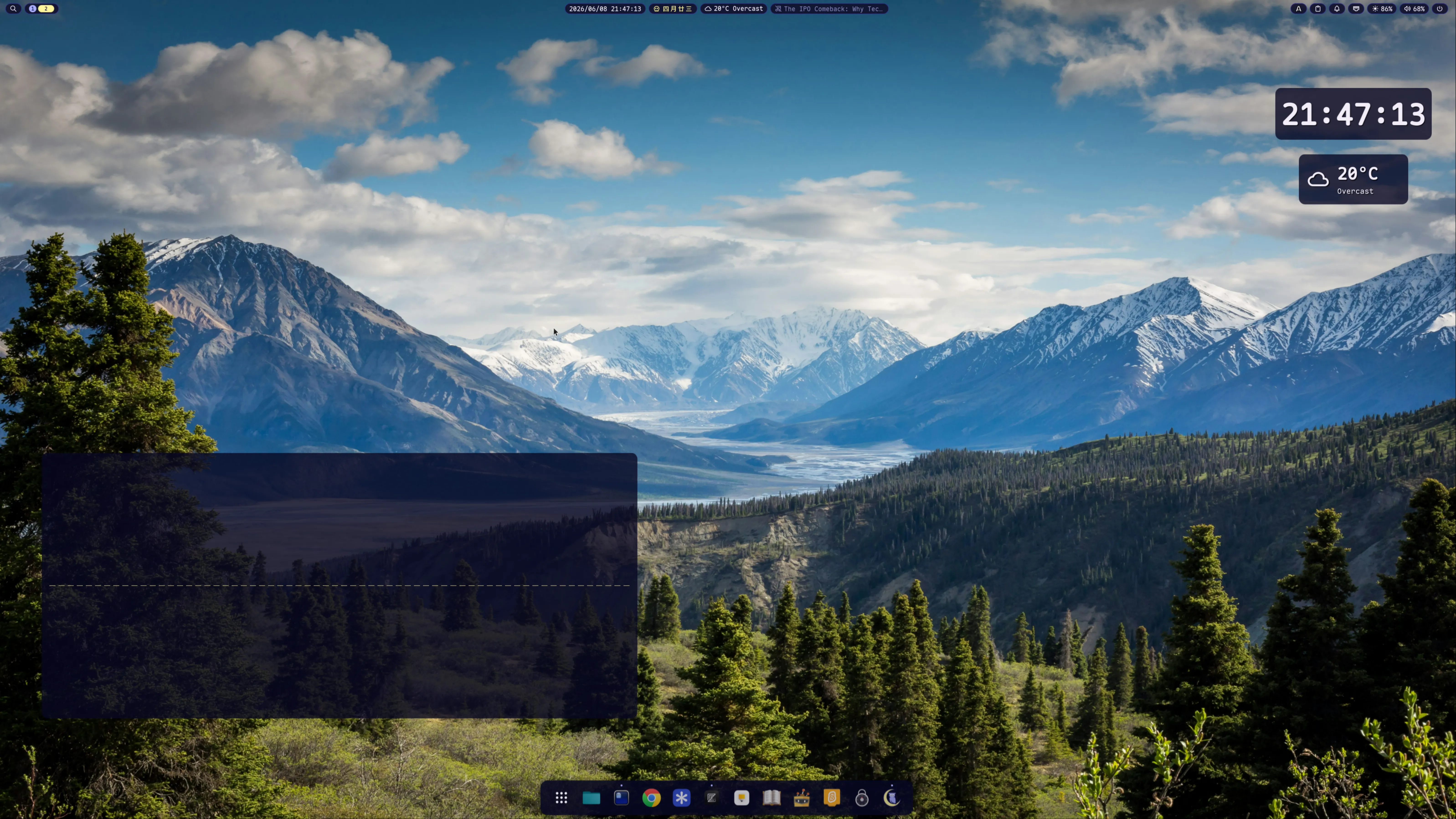
Sway is what I’ve used for years; Noctalia is a wlroots-native C++ shell with the killer capsule_group feature — multiple widgets sharing one visible pill.
Step 1 — Wire up sway startup
~/.config/sway/config:
# Sway has no systemd-session hook; we just import env so user units can find Wayland.# Debian's /etc/sway/config.d/50-systemd-user.conf already does dbus-update-activation-environment.exec dbus-update-activation-environment --systemd XDG_CURRENT_DESKTOP=sway
# Noctalia v5 — desktop shell. exec_always lets Mod+Shift+R reload restart it in place.exec_always sh -c 'pkill -x noctalia; noctalia --daemon'
# polkit graphical agent (sudo dialogs)exec /usr/lib/policykit-1-gnome/polkit-gnome-authentication-agent-1 2>/dev/null || \ /usr/bin/lxqt-policykit-agent
# fcitx5 Chinese inputexec_always sh -c 'pkill -x fcitx5; fcitx5 -d --replace'
# termusic-server — MPRIS music daemon (the termusic patch publishes metadata while Stopped,# so no play/pause priming is needed anymore)exec_always sh -c 'pkill -x termusic-server 2>/dev/null; sleep 1; setsid -f termusic-server'Two sway pitfalls:
;is an IPC separator, not a shell separator.exec_always pkill -x noctalia; noctalia --daemonparses as two IPC commands (the second is invalid). Always wrap insh -c '...'.execvsexec_always—execruns once at login;exec_alwaysre-runs on every config reload. Thepkill -x foo; foopattern withexec_alwaysletsMod+Shift+Rcleanly restart any daemon.
Step 2 — Configure Noctalia (modular TOML)
Noctalia v5 reads ~/.config/noctalia/*.toml in alphabetic order. Split into 6 files:
00-shell.toml # font, polkit, panel transparency_mode10-theme.toml # source, wallpaper-derived palette20-bar.toml # capsule_groups (multi-widget shared pills)30-widgets.toml # per-widget settings (clock format, lunar, media)40-services.toml # weather location, brightness ddcutil, wallpaper90-overrides.toml # one-off final overrides (sandbox)The bar file uses Noctalia’s killer feature, capsule_group:
[bar.default]position = "top"background_opacity = 0.0 # whole bar invisibleend = ["media", "tray", "clipboard", "notifications", "network", "brightness", "volume", "nvidia-gpu-monitoring-plugin", "screen-recorder", "sticky-notes", "noctalia-calculator", "weather", "lunar", "clock", "world-clock", "session"]
# Multiple widgets share ONE pill[[bar.default.capsule_group]]id = "systray"members = ["media", "tray", "clipboard", "notifications", "network", "brightness", "volume", "nvidia-gpu-monitoring-plugin"]opacity = 0.92radius = 14.0
[[bar.default.capsule_group]]id = "tools"members = ["screen-recorder", "sticky-notes", "noctalia-calculator"]opacity = 0.92radius = 14.0
[[bar.default.capsule_group]]id = "time-weather"members = ["weather", "lunar", "clock", "world-clock"]opacity = 0.92radius = 14.0Result: 4 connected pills floating across the top, not 16 individual capsules.
Step 3 — Install Noctalia plugins
Drop plugin directories into ~/.local/share/Noctalia/plugins/<id>/ (the directory name should match manifest.json:id), then enable each one in Control Center → Plugins.
Plugins on my Noctalia setup:
| Plugin | What it does |
|---|---|
nvidia-gpu-monitoring-plugin | Real-time GPU temp / utilization / VRAM (polls nvidia-smi) |
screen-recorder (official) | gpu-screen-recorder wrapper with replay buffer |
sticky-notes | Markdown notes with optional GitHub Gist sync |
noctalia-calculator | Theme-aware calculator with bar widget |
world-clock | Multi-timezone with auto-rotate |
lyrics-fetch | Synced lyrics from lrclib.net |
Once enabled in the GUI, add the matching ID to your 20-bar.toml start / center / end array (and to a capsule_group.members if you want it inside an existing pill).
Step 4 — Configure the dock (optional)
[dock]enabled = trueposition = "bottom"icon_size = 48magnification = truemagnification_scale = 1.45launcher_position = "start"show_running = trueauto_hide = false
# Pin apps by their .desktop basename or reverse-DNS idpinned = ["ghostty", "google-chrome", "zed", "com.system76.CosmicFiles"]Find the right id with ls /usr/share/applications/ ~/.local/share/applications/ | grep <name>.
Caveat about overrides: if you set the dock via the GUI first, ~/.local/state/noctalia/settings.toml gets all 30 fields populated. A partial [dock] block in 90-overrides.toml will overwrite GUI-set fields you don’t repeat. Either keep all fields in your override, or skip overrides and stick to the GUI.
Stack C: labwc + Noctalia
labwc is a stacking compositor (windows overlap like Win/macOS) — my “macOS-feeling” option for stacking work. Same Noctalia shell as the other three stacks.
Step 1 — autostart: scale, Noctalia, session daemons
~/.config/labwc/autostart (chmod +x). labwc runs this once via sh -c, and on exit sends SIGHUP to every child — so background daemons must setsid -f into their own session or they die half a second after starting.
#!/bin/sh
# 4K HiDPI — monitor is on HDMI-A-1 (not DP-1); 1.5× matches the other stackswlr-randr --output HDMI-A-1 --scale 1.5
# Noctalia v5 — desktop shell. It draws its own wallpaper layer, so no swaybg.# setsid -f is mandatory: a bare `&` gets SIGHUP'd when the autostart script exits.pkill -x noctalia 2>/dev/nullsleep 0.3setsid -f noctalia --daemon
# polkit graphical agent (sudo dialogs) — polkit-gnome, fall back to LXQt'ssetsid -f sh -c '/usr/lib/policykit-1-gnome/polkit-gnome-authentication-agent-1 2>/dev/null \ || /usr/bin/lxqt-policykit-agent'
# fcitx5 (Wayland-native input method)setsid -f fcitx5 -d --replace 2>/dev/null
# termusic-server — MPRIS music daemonpkill -x termusic-server 2>/dev/nullsleep 1setsid -f termusic-server
# screen sleep — blank after 5 minsetsid -f swayidle -w timeout 300 "wlopm --off \*" resume "wlopm --on \*" >/dev/null 2>&1No systemd unit is involved — Noctalia is just a spawned process, so there’s nothing for systemd to manage.
Step 2 — environment: scaling + input
~/.config/labwc/environment:
XCURSOR_THEME=PopXCURSOR_SIZE=24
# The compositor does the scaling (wlr-randr 1.5×). Do NOT set GDK_DPI_SCALE — it# stacks on the compositor scale and double-sizes GTK. Native Wayland apps scale via# the fractional-scale protocol automatically; Qt follows the compositor.QT_AUTO_SCREEN_SCALE_FACTOR=1QT_ENABLE_HIGHDPI_SCALING=1
# fcitx5 (authoritative source for labwc's child processes)GTK_IM_MODULE=fcitxQT_IM_MODULE=fcitxXMODIFIERS=@im=fcitxINPUT_METHOD=fcitxSDL_IM_MODULE=fcitxStep 3 — window-border colors that follow the shell
labwc themes its own window borders via an OpenBox-style file. Noctalia exports its current palette as one — ~/.config/labwc/noctalia.conf:
# window border + titlebar — Noctalia teal (#006a64), kept in sync with the bar/dockwindow.active.border.color: #006a64window.inactive.border.color: #006a64window.active.title.bg.color: #006a64window.inactive.title.bg.color: #006a64window.active.label.text.color: #ffffffwindow.inactive.label.text.color: #ffffffStep 4 — root menu (optional)
~/.config/labwc/menu.xml — right-click the empty desktop. Shell actions go through noctalia msg:
<menu id="root-menu"> <item label="Terminal (ghostty)"><action name="Execute" command="ghostty" /></item> <item label="File Manager"><action name="Execute" command="cosmic-files" /></item> <separator /> <item label="Launcher"><action name="Execute" command="noctalia msg panel-toggle launcher" /></item> <item label="Control Center"><action name="Execute" command="noctalia msg panel-toggle control-center" /></item> <item label="Settings"><action name="Execute" command="noctalia msg settings-toggle" /></item> <item label="Power Menu"><action name="Execute" command="noctalia msg panel-toggle session" /></item> <separator /> <item label="Lock"><action name="Execute" command="noctalia msg session lock" /></item> <item label="Reconfigure"><action name="Reconfigure" /></item></menu>As with Stack A, the bar/dock/widgets/theme all live in the shared ~/.config/noctalia/*.toml — only the autostart, environment, and window colors here are labwc-specific.
Stack D: hyprland + Noctalia
hyprland is a dynamic tiling compositor. As of 0.55 it ships a Lua config format, which is what I use here — same Noctalia shell as the other three. (/usr/share/hypr/hyprland.lua is the full reference.)
Step 1 — Monitor + spawn Noctalia
~/.config/hypr/hyprland.lua:
-- 27" 4K AOC on HDMI-A-1; scale 1.5 matches the other stacks (auto picks 2×, too big)hl.monitor({ output = "HDMI-A-1", mode = "preferred", position = "auto", scale = 1.5 })
-- Noctalia v5 — desktop shell. Lua equivalent of the old `exec-once = noctalia --daemon`.hl.on("hyprland.start", function() hl.exec_cmd("noctalia --daemon") hl.exec_cmd("pkill -x fcitx5 2>/dev/null; fcitx5 -d --replace")end)Noctalia is spawned on the hyprland.start event, so it comes up with the session. A crash is restarted by hand: pkill -x noctalia; setsid -f noctalia --daemon.
Step 2 — Environment + theme hook
hl.env("XCURSOR_SIZE", "24")hl.env("GTK_IM_MODULE", "fcitx")hl.env("QT_IM_MODULE", "fcitx")hl.env("XMODIFIERS", "@im=fcitx")hl.env("INPUT_METHOD", "fcitx")hl.env("SDL_IM_MODULE", "fcitx")
require("keybinds") -- window-management + Noctalia IPC binds (Step 3)require("noctalia").apply_theme() -- apply Noctalia's palette to hyprland borders/groupsnoctalia.lua exports the active palette (primary #006a64 teal, etc.) as an apply_theme() that calls hl.config({ general.col.*, group.col.* }), so hyprland’s own borders and group-bars stay in sync with the Noctalia bar when the palette changes.
Step 3 — Keybinds → Noctalia IPC
Same noctalia msg strings as the other stacks, in ~/.config/hypr/keybinds.lua (mainMod = "SUPER"):
hl.bind(mainMod .. " + space", hl.dsp.exec_cmd("noctalia msg panel-toggle launcher"))hl.bind(mainMod .. " + S", hl.dsp.exec_cmd("noctalia msg panel-toggle control-center"))hl.bind(mainMod .. " + comma", hl.dsp.exec_cmd("noctalia msg settings-toggle"))hl.bind(mainMod .. " + V", hl.dsp.exec_cmd("noctalia msg panel-toggle clipboard"))hl.bind(mainMod .. " + N", hl.dsp.exec_cmd("noctalia msg notification-dnd-toggle"))hl.bind(mainMod .. " + X", hl.dsp.exec_cmd("noctalia msg panel-toggle session")) -- power menuhl.bind(mainMod .. " + L", hl.dsp.exec_cmd("noctalia msg session lock"))
hl.bind("XF86AudioRaiseVolume", hl.dsp.exec_cmd("noctalia msg volume-up 3"), { locked = true })hl.bind("XF86AudioLowerVolume", hl.dsp.exec_cmd("noctalia msg volume-down 3"), { locked = true })hl.bind("XF86AudioMute", hl.dsp.exec_cmd("noctalia msg volume-mute"), { locked = true })hl.bind("XF86MonBrightnessUp", hl.dsp.exec_cmd("noctalia msg brightness-up current 5"), { locked = true })hl.bind("XF86MonBrightnessDown", hl.dsp.exec_cmd("noctalia msg brightness-down current 5"), { locked = true })hl.dsp.exec_cmd(...) is the Lua dispatch wrapper; { locked = true } lets the media/brightness keys fire on the lock screen. The rest (focus, workspaces, moving windows) is native hyprland dispatchers — and like the other stacks, the bar/dock/widgets/theme come from the shared ~/.config/noctalia/*.toml.
Shared services
fcitx5 with Maple Mono NF CN
~/.config/fcitx5/conf/classicui.conf:
Vertical Candidate List=FalseWheelForPaging=TrueFont="Maple Mono Normal NF CN Medium Medium 18"MenuFont="Maple Mono Normal NF CN Medium Medium 18"TrayFont="Maple Mono Normal NF CN 15"Theme=macos12-lightDarkTheme=macos12-darkUseDarkTheme=TruePerScreenDPI=TrueEnableFractionalScale=TrueThe "Maple Mono Normal NF CN Medium Medium 18" syntax is family + style + weight + size; the double “Medium” is correct — fcitx5 takes both the named weight and the typographic weight. Apply with fcitx5 -d --replace.
termusic music daemon
~/.config/termusic/server.toml:
version = "2"
[player]music_dirs = ["/home/jenningsl/Musics/班得瑞合集"]loop_mode = "playlist"volume = 80gapless = trueuse_mediacontrols = true # ★ MPRIS — required for noctalia to see termusicbackend = "mpv" # ★ mpv backend, see "Lessons" belowstartup_state = "stopped"
[player.remember_position]music = "no"podcast = "yes"
[backends.mpv]audio_device = "auto" # mpv picks pipewire automatically~/.config/termusic/tui.toml:
version = "2"com = "same"
[behavior]quit_server_on_exit = false # ★ closing TUI does NOT kill server — daemon semantics
[coverart]hidden = true # avoids ueberzug/sixel terminal control noiseFirst-run scan — the server doesn’t scan music_dirs at startup. The TUI does the scan, and the TUI uses crossterm which panics in non-tty environments. So after first install, open a real terminal and run termusic once to populate library.db.
Podcast import (OPML)
pkill -x termusic-server # server must be off — sqlite write conflicttermusic-server import ~/podcasts.opml # bulk import RSS URLsWhy no conky?
Earlier drafts had a Wayland-native conky on the right edge of the screen with CPU / GPU / RAM stats. Removed in 2026-06 — every value it showed (CPU, RAM, GPU temp, GPU utilization) is already in the bar widgets:
- Noctalia —
nvidia-gpu-monitoring-pluginin the systray pill
Two sources of the same numbers is just visual noise.
The Noctalia MPRIS quirk
Noctalia’s media widget rejects MPRIS players that don’t expose “strong” now-playing metadata. From src/dbus/mpris/mpris_service.cpp:
const MprisPlayerInfo info = readPlayerInfoFromProperties(...);if (!playerFailed && !hasStrongNowPlayingMetadata(info)) { removePlayerCacheEntry(busName); // rejected! return;}
bool hasStrongNowPlayingMetadata(const MprisPlayerInfo& info) { return !info.title.empty() || !info.artists.empty() || !info.album.empty();}Termusic in Stopped state used to expose only mpris:trackid="/" — no title/artist/album — so Noctalia rejected it. Worse, Noctalia only re-introspects on NameOwnerChanged (a termusic restart), so it never picked the player up even after playback later started with full metadata.
Fixed at the source (2026-08-03): a termusic patch (0001-mpris-publish-stopped-track-on-startup.patch) now publishes full xesam metadata while Stopped at startup, so Noctalia’s filter passes on the first introspect — no startup dance needed, on any compositor. The general lesson stands: when a Wayland media widget shows “Nothing playing”, check whether the player publishes strong metadata while idle, not just while playing.
Lessons learned
-
One shell across compositors beats two. I briefly ran two shells in parallel; the split just doubled the config surface for no real benefit. Settling on Noctalia everywhere means one set of TOML modules and one IPC (
noctalia msg) shared by all four compositors. -
Fix the root cause once, don’t mirror workarounds. A startup
play; pausedance was tempting to copy into every compositor’s config; fixing it once in termusic (publishing metadata while Stopped) removed the need everywhere. Symmetric configs are wrong when the problem is asymmetric. -
Wayland MPRIS controllers vary in strictness. Noctalia’s hand-rolled C++ filter rejects players without strong now-playing metadata. Always confirm the bus name with
playerctl --list-allfirst, then check what metadata the player publishes while idle. -
NVIDIA + sway — set
SWAY_UNSUPPORTED_GPU=truein~/.config/environment.d/95-sway.confto suppress the boot banner. Sway works fine on the proprietary driver in 2026. -
rusty audio backend has a 44.1k → 48k resample bug — every WAV file picks up static. Use the
mpvbackend instead. The fix requiresmake all-backendsfrom termusic source; the Debian package is rusty-only. -
Termusic library scan needs a real tty. Crossterm panics otherwise — script the first scan interactively, not in a startup hook.
-
Don’t let plugins crash the shell. Always defensive-chain async API responses:
result.message && result.message.body && result.message.body.track. One missing null check on an external API response can take the whole shell down. -
Multiple compositors cost less than expected. Noctalia config is one directory shared across all four; termusic, fcitx5, fonts, and wallpapers are shared too. Switching is just choosing a different SDDM session.
-
man <compositor>is an underused source.man labwcdocuments the exact systemd integration recipe; the online docs often lag the man page.
Files referenced
~/.config/sway/config # sway compositor + spawns~/.config/niri/config.kdl # niri main config~/.config/niri/noctalia/*.kdl # niri Noctalia pieces (binds/outputs/colors)~/.config/niri/user-binds.kdl # niri spawns + binds (user-controlled)~/.config/labwc/{rc.xml,autostart,shutdown,menu.xml} # labwc compositor~/.config/hypr/hyprland.lua # hyprland compositor (Lua)
~/.config/noctalia/00..90-*.toml # Noctalia v5 modular config (shared)~/.local/share/Noctalia/plugins/<id>/ # Noctalia plugins
~/.config/termusic/server.toml # termusic backend + music_dirs~/.config/termusic/tui.toml # quit_server_on_exit = false~/.config/termusic/playlist.log # current playlist (line 0 = index)
~/.config/environment.d/95-sway.conf # SWAY_UNSUPPORTED_GPU=trueThe scrollable tiling of niri is starting to grow on me, but sway’s i3 muscle memory is hard to give up, and labwc makes a nice “macOS-feeling” option for stacking work. They all share one Noctalia shell, so the bar, dock and theme stay identical whichever I pick — switch at SDDM depending on the day’s mood.
Back to Blog