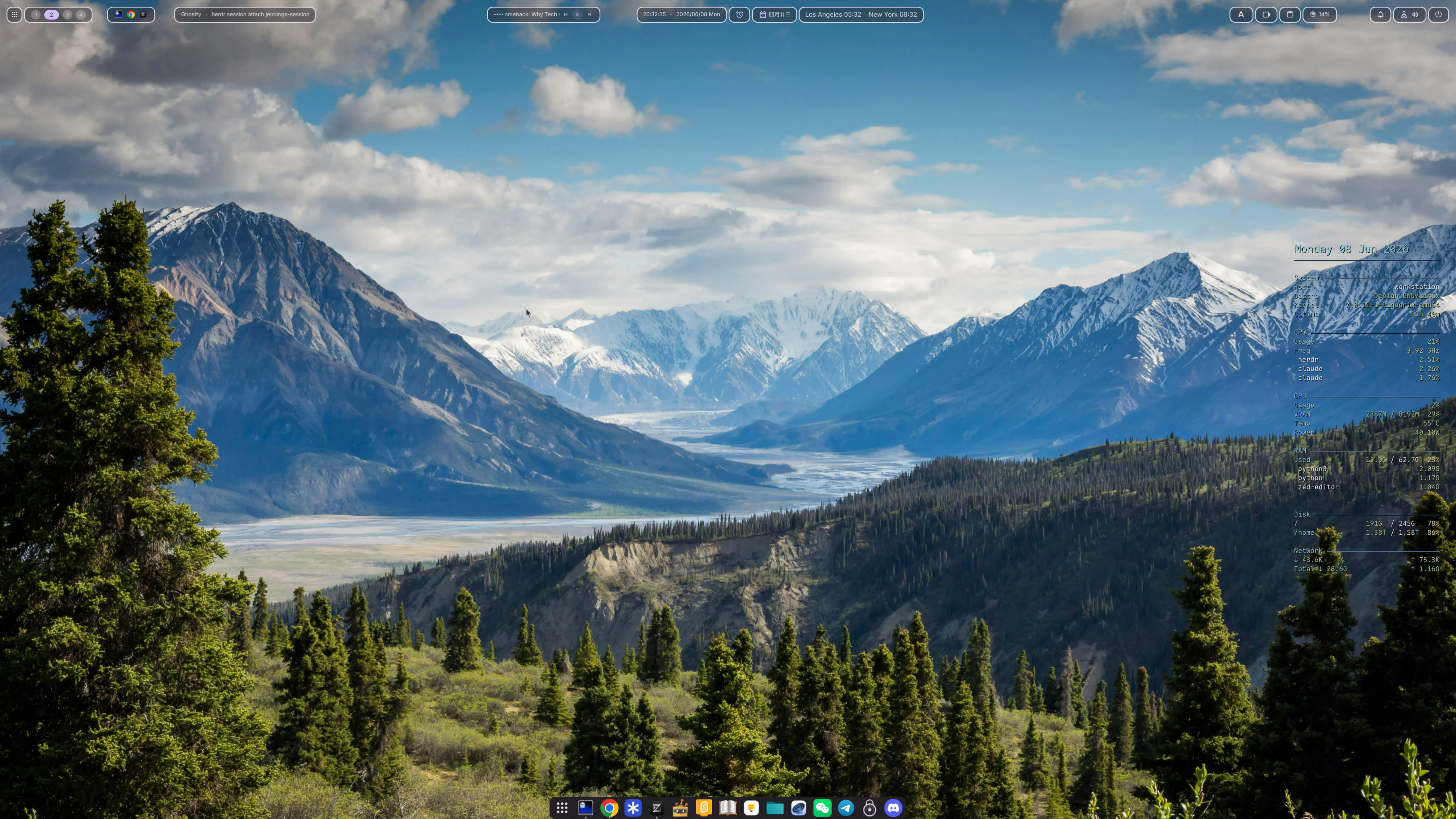
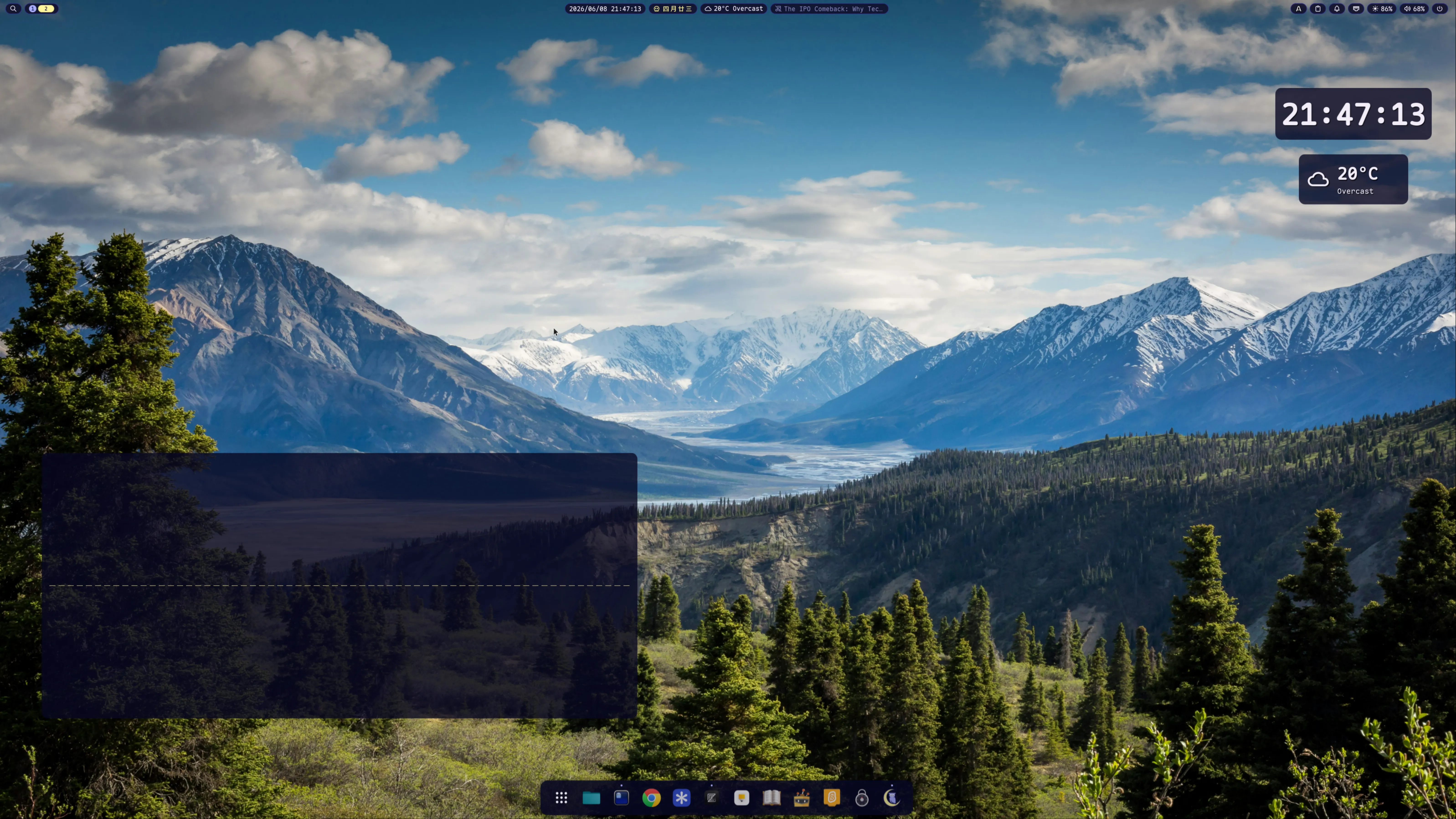
I’ve been using Linux for nearly two decades — Ubuntu, openSUSE, Fedora, Debian. Early on there weren’t many desktop choices, so GNOME was the default. I never warmed to KDE; its UI philosophy never clicked with me. Over time I gravitated toward minimal desktops — XFCE, LXDE, then LXQt. Wayland was the next milestone, but none of these ran well under it. Last year I finally got LXQt working with labwc on Wayland, and it held up until this year when I came across DMS and then Noctalia.
Last week I sat down with my Debian Trixie workstation (NVIDIA GTX 1070 Ti, AOC 27” 4K, 1.2× scale) and built three parallel Wayland desktop stacks that I switch between from SDDM:
Niri + DMS — scrollable-tiling compositor + Material You shell (systemd-managed)
labwc + DMS — stacking compositor (Win/macOS-style) + DMS (systemd-managed via man labwc recipe)
Both shells are lightweight and visually striking. DMS’s Material You theming gives the bar a polished, modern feel; Noctalia’s capsule_group system produces compact, connected widget pills that DMS can’t replicate.
Background
Why two shells?
The two shells launch differently:
DMS
Noctalia
Launcher
dms.service (systemd user unit)
noctalia --daemon (foreground process)
Started by
WantedBy=graphical-session.target
compositor’s exec / spawn-at-startup
Lifecycle
systemd
the compositor
Restart on crash
Restart=on-failure
manual pkill -x; noctalia --daemon
Config
JSON via GUI
TOML modules + GUI
Bar grouping
outline-island workaround
native capsule_group
DMS only works under systemd-aware compositors (niri, hyprland with a hand-written session target, labwc via man labwc’s recipe). Noctalia is the inverse — no systemd unit, designed to be spawned by the compositor.
None — only env-import in /etc/sway/config.d/50-systemd-user.conf
Noctalia
labwc
Stacking (windows overlap)
labwc-session.target ships, man labwc documents the systemd recipe with dms.service as the example
DMS
I pair niri/labwc with DMS because both compositors give me a working systemd chain, and DMS plugs into that for free. I pair sway with Noctalia because sway has no systemd hook and Noctalia doesn’t want one — it’s the simpler match.
The shells are compositor-agnostic at the configuration level. ~/.config/DankMaterialShell/settings.json and ~/.config/noctalia/*.toml work under any supported compositor. Only the compositor-config-side launch line changes when you swap.
After upgrading the source you must just build && sudo just install and restart noctalia, otherwise new widget IDs added to your *.toml won’t render — noctalia config validate only checks TOML syntax, not whether the running binary knows the widget.
4. Build termusic with mpv backend
The Debian package ships only the rusty backend, which mis-resamples 44.1k WAV → static noise. Build from source with --features all-backends and choose mpv:
One font that bundles Nerd Font icons (NF variants) AND CJK glyph coverage (CN variant). Used by both shells, fcitx5, ghostty, vim — everything terminal-ish.
The four lines that produce the outline-island look:
1
"transparency": 0, // bar background fully transparent
2
"widgetTransparency": 0.5, // each capsule 50% opaque
3
"widgetOutlineEnabled": true, // 2px outline traces every capsule
4
"widgetOutlineColor": "surfaceText"// white-ish, high contrast
{"id": "spacer", "size": 60} between clusters breaks them into floating islands. The default spacer is 20px — invisible at 4K. You must pass an explicit size.
Chinese 农历 in the bar (calls Debian’s lunar command)
worldClock
Multi-timezone bar widget with cycling
musicLyrics
Synced lyrics from lrclib / Navidrome / Musixmatch
screenRecorder
gpu-screen-recorder wrapper, start/stop from the bar
alarmClock
Alarms + stopwatch with WAV alarm sound
After installation, set controlCenterWidgets and the relevant barConfigs.centerWidgets / rightWidgets arrays to include the plugin IDs.
Stack B: Sway + Noctalia
Sway is what I’ve used for years; Noctalia is a wlroots-native C++ shell with the killer capsule_group feature — multiple widgets sharing one visible pill.
Step 1 — Wire up sway startup
~/.config/sway/config:
Terminal window
1
# Sway has no systemd-session hook; we just import env so user units can find Wayland.
2
# Debian's /etc/sway/config.d/50-systemd-user.conf already does dbus-update-activation-environment.
; is an IPC separator, not a shell separator. exec_always pkill -x noctalia; noctalia --daemon parses as two IPC commands (the second is invalid). Always wrap in sh -c '...'.
exec vs exec_always — exec runs once at login; exec_always re-runs on every config reload. The pkill -x foo; foo pattern with exec_always lets Mod+Shift+R cleanly restart any daemon.
Step 2 — Configure Noctalia (modular TOML)
Noctalia v5 reads ~/.config/noctalia/*.toml in alphabetic order. Split into 6 files:
members = ["media", "tray", "clipboard", "notifications",
14
"network", "brightness", "volume",
15
"nvidia-gpu-monitoring-plugin"]
16
opacity = 0.92
17
radius = 14.0
18
19
[[bar.default.capsule_group]]
20
id = "tools"
21
members = ["screen-recorder", "sticky-notes", "noctalia-calculator"]
22
opacity = 0.92
23
radius = 14.0
24
25
[[bar.default.capsule_group]]
26
id = "time-weather"
27
members = ["weather", "lunar", "clock", "world-clock"]
28
opacity = 0.92
29
radius = 14.0
Result: 4 connected pills floating across the top, not 16 individual capsules.
Step 3 — Install Noctalia plugins
Drop plugin directories into ~/.local/share/Noctalia/plugins/<id>/ (the directory name should match manifest.json:id), then enable each one in Control Center → Plugins.
Once enabled in the GUI, add the matching ID to your 20-bar.tomlstart / center / end array (and to a capsule_group.members if you want it inside an existing pill).
Step 4 — Configure the dock (optional)
~/.config/noctalia/90-overrides.toml
1
[dock]
2
enabled = true
3
position = "bottom"
4
icon_size = 48
5
magnification = true
6
magnification_scale = 1.45
7
launcher_position = "start"
8
show_running = true
9
auto_hide = false
10
11
# Pin apps by their .desktop basename or reverse-DNS id
Find the right id with ls /usr/share/applications/ ~/.local/share/applications/ | grep <name>.
Caveat about overrides: if you set the dock via the GUI first, ~/.local/state/noctalia/settings.toml gets all 30 fields populated. A partial [dock] block in 90-overrides.toml will overwrite GUI-set fields you don’t repeat. Either keep all fields in your override, or skip overrides and stick to the GUI.
Stack C: labwc + DMS
After Stack A and B I added labwc as a third option — a stacking compositor (windows overlap like Win/macOS) with the same DMS shell as Stack A.
Step 1 — Read man labwc
The man labwc page documents the systemd integration recipe and even uses dms.service as the example service to enable:
A systemd user unit named labwc-session.target is also shipped… It binds to the standard graphical-session.target. Labwc does not activate the target itself; users opt in by adding lines like the following to their autostart and shutdown files:
This makes “open folder” actions everywhere launch cosmic-files.
Shared services
fcitx5 with Maple Mono NF CN
~/.config/fcitx5/conf/classicui.conf:
1
Vertical Candidate List=False
2
WheelForPaging=True
3
Font="Maple Mono Normal NF CN Medium Medium 18"
4
MenuFont="Maple Mono Normal NF CN Medium Medium 18"
5
TrayFont="Maple Mono Normal NF CN 15"
6
Theme=macos12-light
7
DarkTheme=macos12-dark
8
UseDarkTheme=True
9
PerScreenDPI=True
10
EnableFractionalScale=True
The "Maple Mono Normal NF CN Medium Medium 18" syntax is family + style + weight + size; the double “Medium” is correct — fcitx5 takes both the named weight and the typographic weight. Apply with fcitx5 -d --replace.
termusic music daemon
~/.config/termusic/server.toml:
1
version = "2"
2
3
[player]
4
music_dirs = ["/home/jenningsl/Musics/班得瑞合集"]
5
loop_mode = "playlist"
6
volume = 80
7
gapless = true
8
use_mediacontrols = true# ★ MPRIS — required for noctalia/DMS to see termusic
9
backend = "mpv"# ★ mpv backend, see "Lessons" below
quit_server_on_exit = false# ★ closing TUI does NOT kill server — daemon semantics
6
7
[coverart]
8
hidden = true# avoids ueberzug/sixel terminal control noise
First-run scan — the server doesn’t scan music_dirs at startup. The TUI does the scan, and the TUI uses crossterm which panics in non-tty environments. So after first install, open a real terminal and run termusic once to populate library.db.
Podcast import (OPML)
Terminal window
1
pkill-xtermusic-server# server must be off — sqlite write conflict
Earlier drafts had a Wayland-native conky on the right edge of the screen with CPU / GPU / RAM stats. Removed in 2026-06 — every value it showed (CPU, RAM, GPU temp, GPU utilization) is already in the bar widgets:
DMS — cpuUsage widget in the bar; nvidia-smi values not built-in but available via the nvidia-gpu-monitoring-plugin if you want them
Noctalia — nvidia-gpu-monitoring-plugin in the systray pill
Two sources of the same numbers is just visual noise.
The Noctalia MPRIS quirk
After hooking termusic-server up I noticed an asymmetry:
DMS bar’s media widget worked immediately — it could play, pause, skip from the bar
Noctalia bar’s media widget showed “Nothing playing”
Both shells listen to the same MPRIS bus. The difference is in the discovery filter.
Noctalia (src/dbus/mpris/mpris_service.cpp:1721):
1
const MprisPlayerInfo info =readPlayerInfoFromProperties(...);
2
if (!playerFailed &&!hasStrongNowPlayingMetadata(info)) {
// No filter. Every MPRIS player on the bus is available.
Termusic in Stopped state exposes only mpris:trackid="/" — no title, artist, or album. Noctalia rejects it. Worse: Noctalia only re-introspects on NameOwnerChanged (i.e., termusic restart), so even after termusic later starts playing with full metadata, Noctalia never re-queries.
Workaround — make termusic briefly play then pause at startup so Noctalia’s first introspect catches strong metadata. This is the trailing play; pause in Stack B’s sway config:
Terminal window
1
exec_alwayssh-c'
2
pkill -x termusic-server 2>/dev/null
3
sleep 1
4
setsid -f termusic-server
5
sleep 4 # wait for MPRIS registration
6
playerctl --player=termusic play 2>/dev/null # populate metadata
7
sleep 1
8
playerctl --player=termusic pause 2>/dev/null # back to Paused
9
'
About 6 seconds of silence at login, no audible interruption, and Noctalia caches termusic permanently.
This workaround is only needed for sway+Noctalia. niri+DMS and labwc+DMS do NOT need it. Don’t mirror it across stacks symmetrically.
Lessons learned
Pair compositor with the shell that matches its lifecycle model. systemd-aware compositors (niri, labwc with the man-page recipe) → DMS. Bare-binary compositors (sway) → Noctalia. Forcing the wrong pair adds ceremony for nothing.
Don’t mirror workarounds across stacks. I added the Noctalia MPRIS play; pause workaround to all three compositors initially. Only sway+Noctalia needs it. Symmetric configs are tempting but wrong when the underlying problem is asymmetric.
DMS plugin QML uses different property names than regular QML — DankIcon is size: not font.pixelSize:, Proc.runCommand callback is (stdout, exitCode) not a single object. Read existing plugins before writing your own.
Wayland MPRIS controllers vary wildly in strictness. Quickshell’s Mpris service is liberal; Noctalia’s hand-rolled C++ filter is strict. Always test with playerctl --list-all first to confirm the bus name is registered, then test in each shell separately.
NVIDIA + sway — set SWAY_UNSUPPORTED_GPU=true in ~/.config/environment.d/95-sway.conf to suppress the boot banner. Sway works fine on the proprietary driver in 2026.
rusty audio backend has a 44.1k → 48k resample bug — every WAV file picks up static. Use the mpv backend instead. The fix requires make all-backends from termusic source; the Debian package is rusty-only.
Termusic library scan needs a real tty. Crossterm panics otherwise — script the first scan interactively, not in a startup hook.
Don’t let plugins crash the shell. A musicLyrics Musixmatch parser tried to read result.message.body.track.track_id without a null check — when YouTube videos returned an empty body, Quickshell’s QML binding system segfaulted. Always defensive-chain async API responses: result.message && result.message.body && result.message.body.track.
Two stacks cost less than expected. DMS and Noctalia configs are independent files in different directories. Termusic, fcitx5, fonts, and wallpapers are all shared. Switching is just choosing a different SDDM session.
man <compositor> is an underused source.man labwc documents the exact systemd recipe and names dms.service as the example. The DMS install doc still lists labwc as “Coming Soon” — but the labwc man page beat them to it.
The scrollable tiling of niri is starting to grow on me, but sway+Noctalia’s connected-pill bar is hard to give up, and labwc + DMS makes the third path my “macOS-feeling” option for stacking work. All three coexist on the same machine — switch at SDDM depending on the day’s mood.